Amazon's 1099-K reports gross, unadjusted payments — not revenue. Every seller eventually has
to bridge that number down to what their books actually show. 1099-K reconciliation software
for Amazon sellers exists to do that bridge automatically, instead of by hand every January.
Why the 1099-K needs reconciling in the first place
Box 1a on Form 1099-K reports the total amount buyers paid — full stop. No netting for
refunds, no netting for the fees Amazon deducted before paying you out. If a customer paid
$50 and later got a full refund, that $50 is still in Box 1a. So the form isn't measuring
revenue; it's measuring gross transaction volume before a single deduction. Every seller who
compares it to their books hits the same gap.
The bridge a 1099-K reconciliation has to walk
Gross amount per 1099-K (Box 1a) Amazon's total for every payment transaction in the tax year, before a single deduction.
Less: refunds Every dollar refunded to a customer during the year — usually the largest single adjustment.
Less: referral fees, FBA fulfilment, and other Amazon fees All deducted at settlement, but still counted in the gross figure the form reports.
Plus or less: sales tax and PYOP Marketplace-facilitator tax and Amazon-currency payments — small lines that still have to be walked, even at $0.00.
Net revenue, as it should appear in your books If this figure matches your books' revenue for the year, the two documents are reconciled — even though the headline numbers look nothing alike.
What 1099-K reconciliation software for Amazon sellers should actually do
Runs the bridge automatically, month by month. Not just a year-end total — a monthly comparison of your own imported Amazon data against the form, so a missing month or a real variance shows up where it happened.
Tells you which variances are expected. A December/January timing difference is normal and documented Amazon behaviour, not a bug to chase. Software built for this should say so, not leave you guessing.
Breaks a variance down by component. Product sales, sales tax, promotional rebates, shipping and gift-wrap credits, PYOP — each reconciled on its own, so a real discrepancy is traceable to a cause instead of one opaque total.
Ties out to real financial statements. The reconciliation and the profit and loss should come from the same ledger — not two disconnected tools that happen to both mention Amazon.
How SellerTally reconciles it
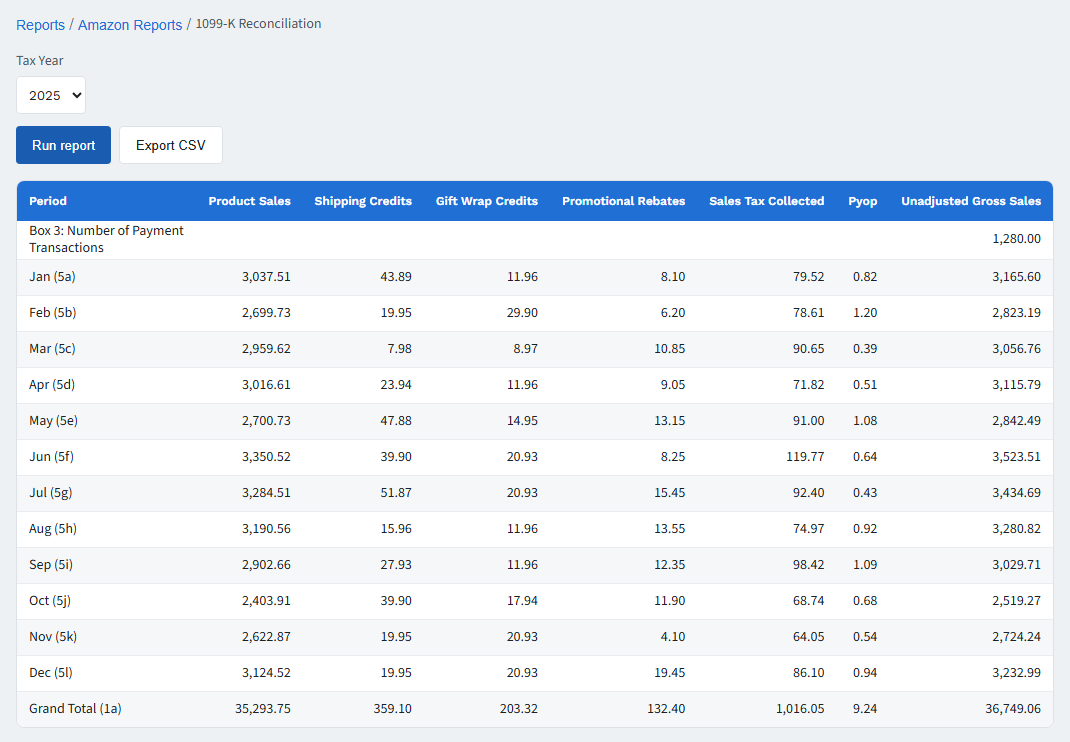
SellerTally's 1099-K Reconciliation report runs this exact bridge automatically for every
imported month of the tax year, laid out the same way Amazon's own 1099-K does — one row per
month, one column per box — computed from your own Amazon data using the same formula printed
on the form. Product sales, shipping credits, gift-wrap credits, promotional rebates, sales tax
collected, and PYOP are broken out separately, so if a number looks off it's traceable to one
component instead of one unexplained total.
Because both reports read from the same ledger that produces your trial balance, profit and
loss, and balance sheet, the reconciliation and your financial statements always agree with
each other. See the step-by-step walkthrough in
reconciling your 1099-K in
SellerTally, or the full picture of how we handle Amazon accounting on the
amazon accounting software page.
Sample data from our public demo, not a real seller's account. Try it yourself on the live demo.
See your own 1099-K reconciled
Free trial. Import your Amazon settlement data and see the bridge run against your own
numbers, not a demo.